
Try this agent skill to have your favourite agentic assistant (Claude Code, Kiro, Cursor, Copilot etc.) construct shareable AWS Pricing Calculator estimates from sources like CloudFormation/Terraform, design documents, AWS service lists or prompts.
Table of contents
Introduction
Most people working with cloud have probably suggested creative new ideas and received responses such as: “Sounds great, but what will it cost? – Well, it depends” you say. Having clear insight into cost estimations to justify what to spend developer time and money on is not straightforward. There are many paths to Rome, but one well trod path is the good old AWS Pricing Calculator: calculator.aws.
It can help you, your team and your manager get more confidence into predicted cloud spend across different AWS components and end user request patterns.
Your solution may already be described in design documents or implemented in Terraform, but translating it to the AWS Pricing Calculator is a manual chore; time consuming and error prone. One has to click around a lot in the web UI, and there is as of writing no decent automation support. AWS services may be left out and important parameters may be missed.
At Sopra Steria I create and update AWS Pricing Calculator estimates quite often. I expect others also can relate to some of these friction points:
- Manual and time-consuming; Services are added by clicking through forms, field by field, although the architecture already exists as Terraform or a design document.
- Not reproducible; The inputs live in a browser session and in someone’s head. Another person, or the same person later, gets a different estimate, and the reasoning behind each number is not recorded.
- Not scriptable; The public calculator has no official API for creating estimates.
- Incomplete by default; The calculator does not prompt for common cost lines (root volumes, data transfer, backup storage, Multi-AZ, support plan) and does not model some billing details, such as management fees or minimum storage durations on archival tiers.
- Unreliable when delegated to an agent; Without tooling, an agent recalls prices from training data or scrapes pricing pages that render client-side. The numbers look authoritative but are not current, and no estimate exists that anyone can open.
AWS did launch the Pricing API MCP server, which helps, but the outcome is dependent on prompting and the agent’s own understanding. In my experience getting Claude Code or Kiro to help generate cost estimations to tables in Markdown sped things up, but I discovered that there is no guarantee for consistency with the AWS Pricing Calculator, which is deemed the source of truth for AWS Partner processes such as MAP and POC funding requests, proper deal sizing for AWS Partner Central Opportunity management. Link sharing is indeed a meaningful feature when working with cost estimates across teams, client proposals in pre-sales, in addition to dialogues with AWS Account Managers.
I made an attempt to automate this with a Kiro custom agent and steering definition based on Amazon Bedrock AgentCore Browser, but the Pricing Calculator site did not render well, the agent often got confused, and the outcome was not consistent.
The solution
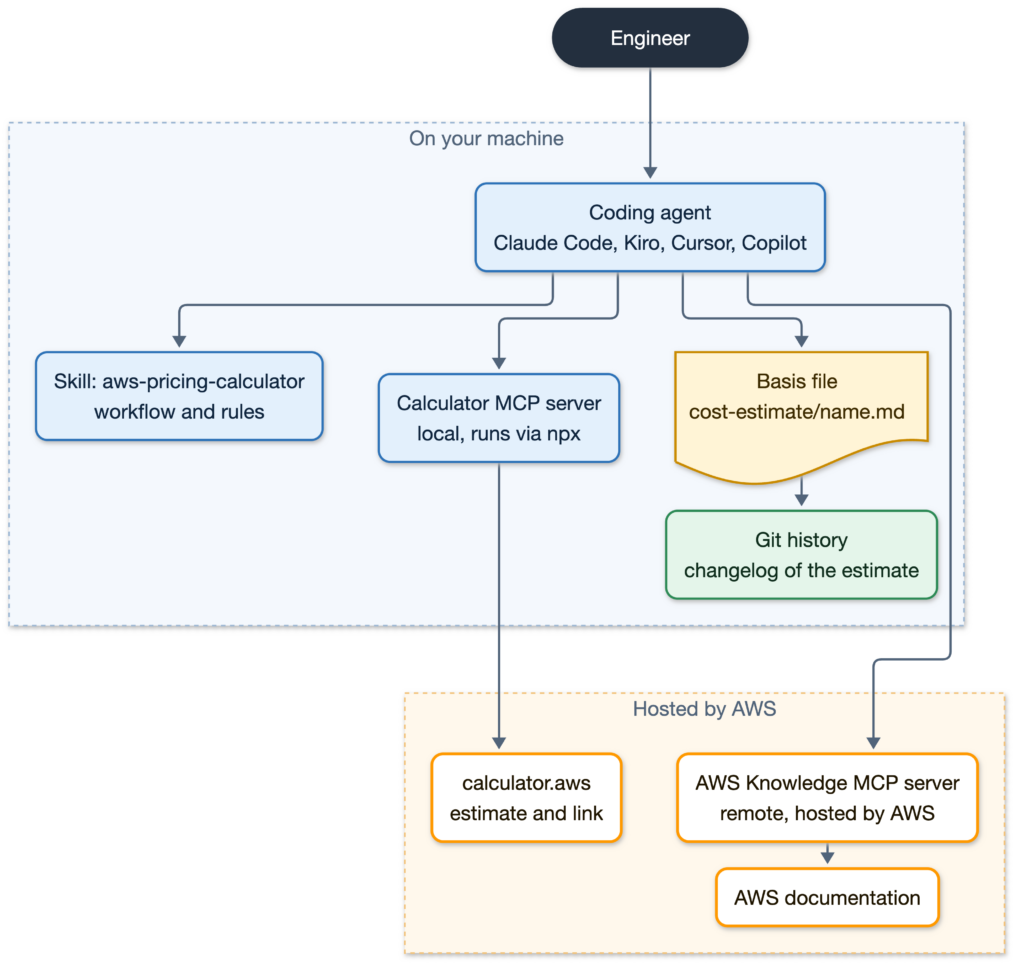
When I discovered the custom AWS Pricing Calculator MCP server, the pieces finally came together. This one is not in the official list of Open Source MCP Servers for AWS, but hidden in an aws-samples GitHub repository: https://github.com/aws-samples/sample-aws-pricing-calculator-mcp. At the time of writing it is not an officially supported AWS Product, so it runs locally through npx. The Knowledge server is hosted by AWS and needs no install.
This solution contains two skills (aws-pricing-calculator plus aws-pricing-calculator-getting-started) and is packaged as a plugin for easy integration into workflows for Claude Code, Kiro, Cursor and other agents.
How it works
Your favourite agent assistant constructs estimates by following a defined workflow:
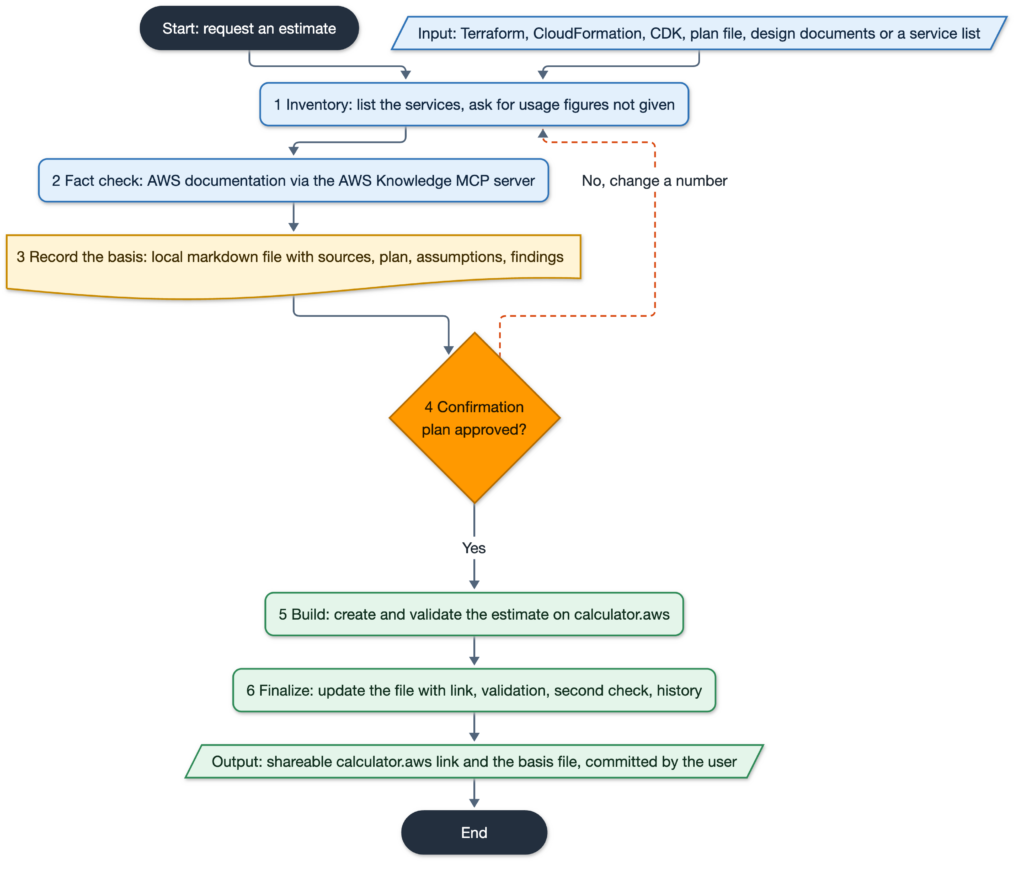
- Inventory: List services from Infrastructure-as-Code (CloudFormation, CDK, Terraform), Terraform plan file, design documents or user-supplied list, and asks for usage figures that were not given.
- Fact check: Check design against current AWS documentation (AWS Knowledge MCP server) for cost components the calculator does not model, commitment-versus-workload mismatches and storage-class constraints.
- Record the basis: Write a local markdown file (cost-estimate/.md by default) with sources, plan table, an assumptions table that marks each input as confirmed or estimated, and the documentation findings.
- Confirmation: Present the plan table (service, sizing, key assumption) and wait for user review and approval before anything is written to calculator.aws, to save time and duplicate efforts.
- Build: Creates the actual estimate, validate, and return the shareable calculator.aws link. An estimate without a link is not considered done.
- Finalize: Update the same file with the link, the validation result, a second documentation check of the built estimate and a history row, and check a list of commonly missed cost lines.
The datapoint basis file is plain markdown inside the project. Instead of manual changes in the Web UI, leading to a new calculator URL and no one can explain the differences, teams can track a changed assumption as a git diff. Each rebuild adds a history row with its new link. The agent writes the file but never commits or pushes it, that’s up to your workflow definition to decide.
Use-cases and benefits
With this agent plugin you can easily:
- Cost check on Terraform before it ships. Estimate a new module or environment from the code or the plan, so cost is reviewed alongside the change instead of after the first bill (if you’re not using Infracost and similar tools). The calculator link could be added in Jira etc.
- Baseline an existing deployment. Estimate the running cost of an environment from Infrastructure-as-Code or design documentation for a handover, a managed-service price or a budget conversation.
- Compare design options. Run the skill once per option (for example single-AZ against Multi-AZ, or Fargate against EKS) and easily compare the resulting estimates, each with its own listed assumptions. Or even have the agent combine them in separate groups.
- Pre-sales proposals. Turn a design document or architecture description into a
calculator.awslink that can be sent to the customer and adjusted together with them. - AWS Partner funding and opportunities. Produce the Pricing Calculator estimate that MAP and POC requests attach, or that Partner Central imports for deal sizing, without re-typing the architecture into the UI.
Before and after
| Area | Hand-built approach | With the skill |
|---|---|---|
| AWS service/component configuration | Re-typed in the UI | Read from Terraform or documents; the user reviews a table |
| Reproducibility | Depends on the person | Same workflow, every assumption listed |
| Traceability | Inputs not recorded | Intermediate local file for data points to be exported to the calculator, tracked in git; a changed parameter is a git diff |
| Completeness | What the user remembers | Checklist of commonly missed lines plus documentation check |
Practical example
Here’s how the experience looks like when asking Claude Code for an estimate of my weather forecast sample app, as previously described at hedrange.com/2025/08/11/how-to-use-kiro-for-ai-assisted-spec-driven-development/.
❯ Help me build an AWS Pricing Calculator estimate from https://github.com/haakond/terraform-aws-weather-forecast/tree/main/examples/production-deployment

⏺ Skill(aws-pricing-calculator:aws-pricing-calculator)
Successfully loaded skill

  Called aws-pricing-calculator, ran 8 shell commands

⏺ Reading the example's three child modules (backend, frontend, monitoring) to inventory the AWS resources before I plan the estimate.

  Ran 8 shell commands

⏺ User answered Claude's questions:
· What monthly API request volume should the estimate assume? (Each request = one GET /weather call → API Gateway + Lambda + usually a DynamoDB read; cache TTL is 1 h so Lambda only calls met.no and writes to DynamoDB once per city per hour.) → 100K requests/month (Recommended)
· Which region and extras should be included? → eu-west-1, no support plan (Recommended)

⏺ Calling aws-pricing-calculator, aws-knowledge 5 times…
    "Lambda, API Gateway, DynamoDB, S3, CloudFront, CloudWatch, Synthetics, X-Ray, SNS"

⏺ Write(cost-estimate/weather-forecast-production.md)
Wrote 55 lines to cost-estimate/weather-forecast-production.md
# Cost estimate basis: terraform-aws-weather-forecast, examples/production-deployment

⏺ I've written the estimate basis and I'm waiting for your go-ahead before anything is created on calculator.aws.

Basis file: cost-estimate/weather-forecast-production.md. It covers the full module set (backend, frontend, monitoring), not just the example's alarm and SNS topic. Region is eu-west-1 and traffic is 100K requests/month, as you confirmed.

┌──────────────────────────────────┬──────────────────────────────────────────────────────────────────────────────────────────────┬────────────────────────────────────────────────────┐
│             Service              │                                        Sizing/config                                         │                   Key assumption                   │
├──────────────────────────────────┼──────────────────────────────────────────────────────────────────────────────────────────────┼────────────────────────────────────────────────────┤
│ Lambda (weather API)             │ x86, 512 MB, 103K requests, 300 ms average                                                   │ Duration is a best-effort average                  │
├──────────────────────────────────┼──────────────────────────────────────────────────────────────────────────────────────────────┼────────────────────────────────────────────────────┤
│ Lambda (canary, second function) │ x86, 960 MB, 2,880 runs, 20 s average                                                        │ rate(15 minutes) schedule; duration is best-effort │
├──────────────────────────────────┼──────────────────────────────────────────────────────────────────────────────────────────────┼────────────────────────────────────────────────────┤
│ API Gateway (REST)               │ 103K requests, no cache                                                                      │ REST API, not HTTP API                             │
├──────────────────────────────────┼──────────────────────────────────────────────────────────────────────────────────────────────┼────────────────────────────────────────────────────┤
│ DynamoDB on-demand               │ 103K reads, 2,880 writes, 0.01 GB, PITR on                                                   │ 4 cities × 24 refreshes × 30 days                  │
├──────────────────────────────────┼──────────────────────────────────────────────────────────────────────────────────────────────┼────────────────────────────────────────────────────┤
│ S3, website bucket               │ 0.1 GB, versioned                                                                            │ Small React build                                  │
├──────────────────────────────────┼──────────────────────────────────────────────────────────────────────────────────────────────┼────────────────────────────────────────────────────┤
│ S3, Synthetics artifacts         │ 18 GB year-1 average, ~14K PUTs                                                              │ ~1 MB per run, no lifecycle rule                   │
├──────────────────────────────────┼──────────────────────────────────────────────────────────────────────────────────────────────┼────────────────────────────────────────────────────┤
│ CloudFront (PriceClass_100)      │ 28 GB out, ~230K requests                                                                    │ 25K visits × ~1 MB, plus canary loads              │
├──────────────────────────────────┼──────────────────────────────────────────────────────────────────────────────────────────────┼────────────────────────────────────────────────────┤
│ CloudWatch                       │ 2,880 canary runs, ~1 GB logs at 180-day retention, 2 custom metrics, 8 alarms, 2 dashboards │ Log volume is reasoned from request count          │
├──────────────────────────────────┼──────────────────────────────────────────────────────────────────────────────────────────────┼────────────────────────────────────────────────────┤
│ X-Ray                            │ ~106K traces recorded                                                                        │ Active tracing on Lambda, API stage and canary     │
└──────────────────────────────────┴──────────────────────────────────────────────────────────────────────────────────────────────┴────────────────────────────────────────────────────┘

SNS, IAM and the usage plan are left out because they cost roughly nothing.

Findings from the documentation check:
- Canary cost: The Synthetics canary runs every 15 minutes. Its runs, Lambda, logs and S3 artifacts are one of the larger cost lines. The README's cost table doesn't mention it.
- Artifact growth: The artifacts bucket has no lifecycle rule, so it grows indefinitely at about 2.9 GB/month. I modeled the year-1 average.
- Glacier transition risk: The website bucket moves larger objects to Glacier Flexible Retrieval after 90 days. A bundle that isn't redeployed in that time would need a restore before CloudFront can read it. The cost is negligible, but it is a functional risk.

Several figures are best-effort and not asked: Lambda durations, site visits, artifact size and log volume. They are marked as such in the basis file. Dashboards are included at two, and they're free if your account has fewer than three.

Should I build the estimate as shown, or change anything first? On "go" I'll create it, validate it and export the shareable link.

- Go!

⏺ The estimate is exported. Next I'll read the saved total back, run the second documentation check, and finalize the basis file.
⏺ Update(cost-estimate/weather-forecast-production.md)
⏺ Estimate link: https://calculator.aws/#/estimate?id=1b9c57c81060b026ecdf52e42c092ac0bada3d72

- Not modeled: The calculator has no field for DynamoDB point-in-time recovery storage or for 180-day CloudWatch Logs retention storage. Both are small at this volume. Lambda-to-met.no data transfer is inside the free egress allowance.

This is a planning figure built on an AWS sample tool that uses undocumented calculator APIs. It is not an AWS quote.Produced estimate: https://calculator.aws/#/estimate?id=1b9c57c81060b026ecdf52e42c092ac0bada3d72 with an annual cost of 114.11 USD, which is about $9.50 per month.
Setup instructions
Prerequisite: Node.js. Check with node --version. No AWS account or credentials are needed.
Claude Code – As plugin
- In a Claude Code session, add the marketplace and install the plugin with:
/plugin install aws-pricing-calculator --marketplace haakond/aws-pricing-calculator-skill - Choose a scope when prompted, then run
/reload-pluginsif asked. - Verify:
claude plugin listin a terminal showsaws-pricing-calculatoras enabled.
Kiro – As Power
- Open the Powers panel and choose Add Custom Power → Import power from GitHub.
- Enter
https://github.com/haakond/aws-and choose Install.pricing-calculator-skill - Verify: the MCP server list shows two entries ending in
pricing-calculatorandaws-knowledge, both Connected.
Cursor
- Open Customize and choose Add Marketplace → Import from Repo.
- Enter
https://github.com/haakond/aws-.pricing-calculator-skill - Verify: both MCP servers (
pricing-calculatoraws-knowledge) appear in Cursor’s MCP settings, and theaws-pricing-calculator/in Agent chat.
Check the setup
Ask the agent to get you started: “Get me started with the AWS Pricing Calculator plugin.” This runs the aws-pricing-calculator-getting-started skill. It confirms that both MCP servers are connected, summarises the estimating workflow and asks what you want to estimate. It does not create or change any estimate. To call it directly, use /aws-pricing-calculator:aws-pricing-calculator-getting-started in Claude Code, or /aws-pricing-calculator-getting-started in Kiro and Cursor.
Other agents (manual setup)
See https://github.com/haakond/aws-pricing-calculator-skill#other-agents-manual-setup.
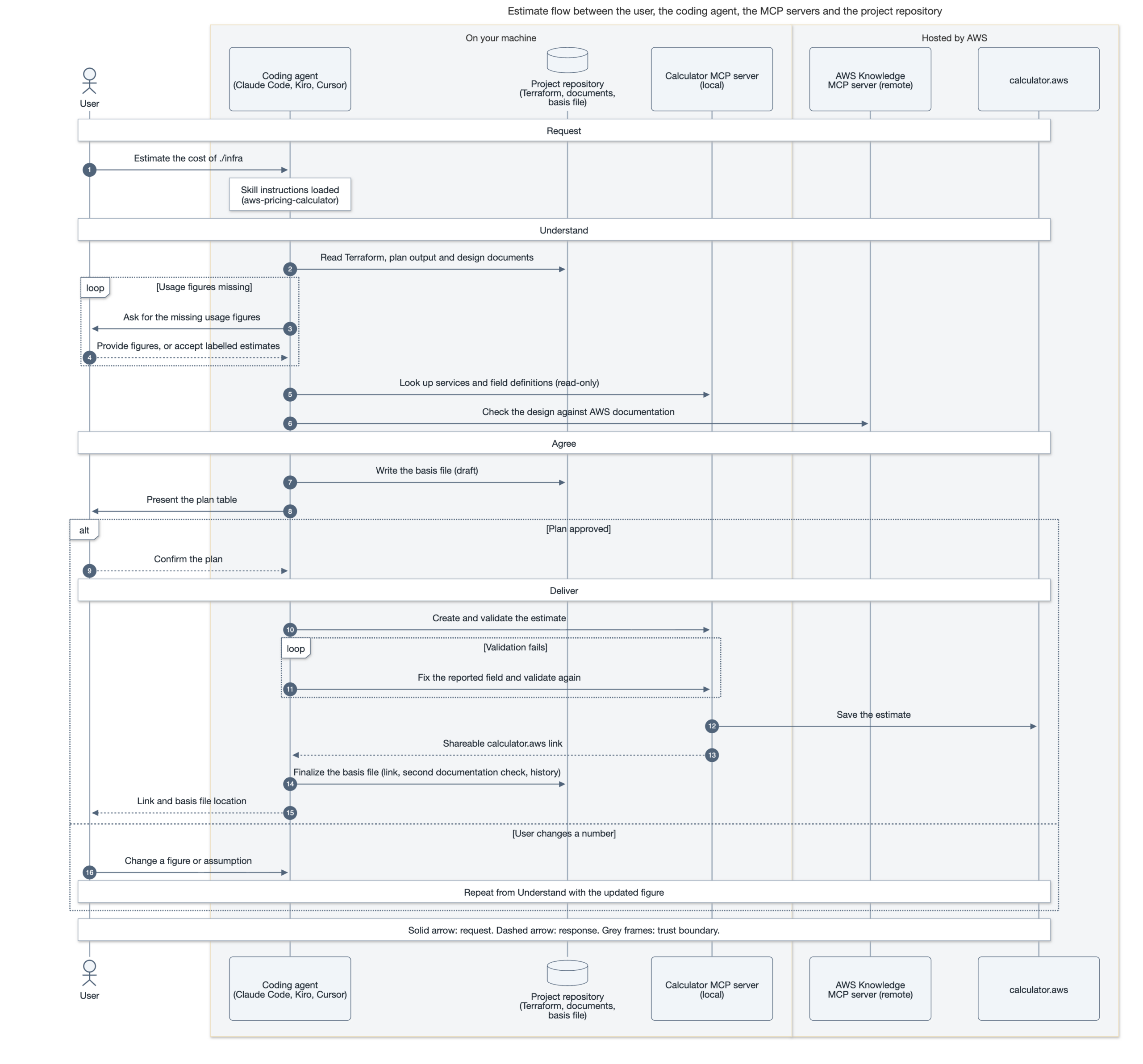
Deep dive: full sequence diagram
Below is full insight of the working components.
Conclusion
This solution could be of great help for:
- Solutions Architects estimating the cost of an AWS solution or a proposed design
- Pre-sales engineers who need an estimate that must be reviewed before shared with a customer
- AWS Partner teams preparing estimates for Partner Central processes such as opportunity deal sizing and funding requests
- Anyone defining architecture in Infrastructure-as-Code or design documents and needs a matching calculator.aws estimate
The AWS Pricing Calculator MCP server could of course be used directly. This solution packages a complete opinionated workflow as a plugin, so it’s faster to get up to speed.
Try it out yourself, there’s more information in the GitHub repo: https://github.com/haakond/aws-pricing-calculator-skill/blob/main/README.md.
Feedback and pull requests are welcome.
Disclaimer: This is an independent community project, not affiliated with or endorsed by AWS.